
Timer
A timer has the value of a logical tag (true or false) and switches based on a defined schedule.
A timer can be used as a source for another tag, which then switches something or is further processed programmatically in a PLC program or a script.
Create a timer
In the tree, a new timer can be created in the Global values node via the icon. The timer is managed centrally in the cloud and can be used and visualized like any other tag.
Define a weekly schedule
The schedule is divided into 15-minute intervals and is edited directly with the mouse. If the click starts in an empty field, the selected time range is activated. If the click starts in an already marked field, the selected time range is deactivated.

Exceptions can be defined via Add special day.
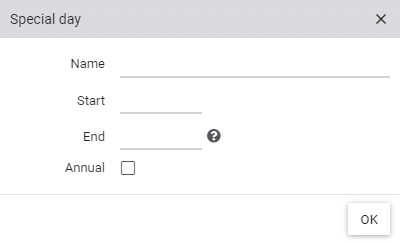
A special day consists at least of Name and a Start (e.g. "New Year" on 01 January). If the exception is to be applied for more than one day, an End must also be defined. If the special day rule should be applied every year, the checkbox Annually must be activated.
After clicking OK a new line appears in the schedule where the active time ranges can be selected.