
IBHsoftec
On the IBH Link UA from IBH Softec, the Universal Cloud Adapter is pre-installed from firmware version 5.26. It only needs to be activated in the web interface of the device. A separate installation is not required.
Network Connection
The IBH Link UA separates the management level from the control level:
| Port 1 |
Management level Connect this port to the network with internet access |
| Ports 2–4 |
Control level Connection of PLCs and field devices |
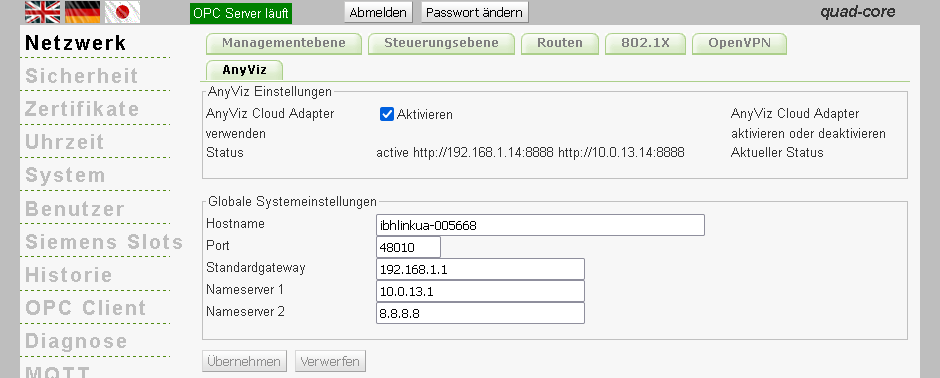
The Cloud Adapter requires an internet connection via the management level. Make sure that a valid standard gateway and name server are configured under Network.
Activate Cloud Adapter
In the web interface of the IBH Link UA, navigate to Network → AnyViz and select Enable. Under Status, the URLs of the Cloud Adapter web interface are displayed for both the management level and the control level.
Setup
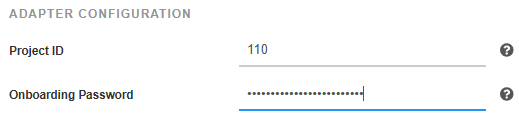
Open one of the URLs shown under Status (e.g. http://[IP address]:8888) and enter the AnyViz project ID and an onboarding password.
Note: The web interface can only be opened from a computer in the same subnet as the IBH Link UA.
Universal Cloud AdapterAccess PLC Variables
The variables of the connected controllers are accessed via the OPC-UA server of the IBH Link UA. In the web interface of the Cloud Adapter, navigate to Connections and create a new OPC-UA connection with the following parameters:
| Server url |
opc.tcp://[IP address]:48010The port of the OPC-UA server is shown under Network in the global system settings |
| User name / Password | Leave empty unless a user is configured on the IBH Link UA |
Trust certificate
When connecting for the first time, the certificate of the Cloud Adapter is transferred to the IBH Link UA and initially blocked. To allow the connection, navigate to Certificates in the web interface of the IBH Link UA, select the certificate OPC-UA-Connection@… and click Trust.

After a successful connection, the connection status turns green and the number of available symbols is displayed. Global variables are listed under Parameter Set, data blocks under Programs.
OPC-UA