
Insevis
The Universal Cloud Adapter is pre-installed on the IIoT gateways of the INSEVIS GC300 series. It only needs to be activated in the configuration interface of the gateway.
Prerequisites
The configuration interface of the gateway is only accessible via the LAN port:
- Connect to the LAN port of the gateway via Ethernet
-
Open http://192.168.80.60 in a web browser
Default username: admin, default password: admin - Ensure that an internet connection is established
Activate Cloud Adapter
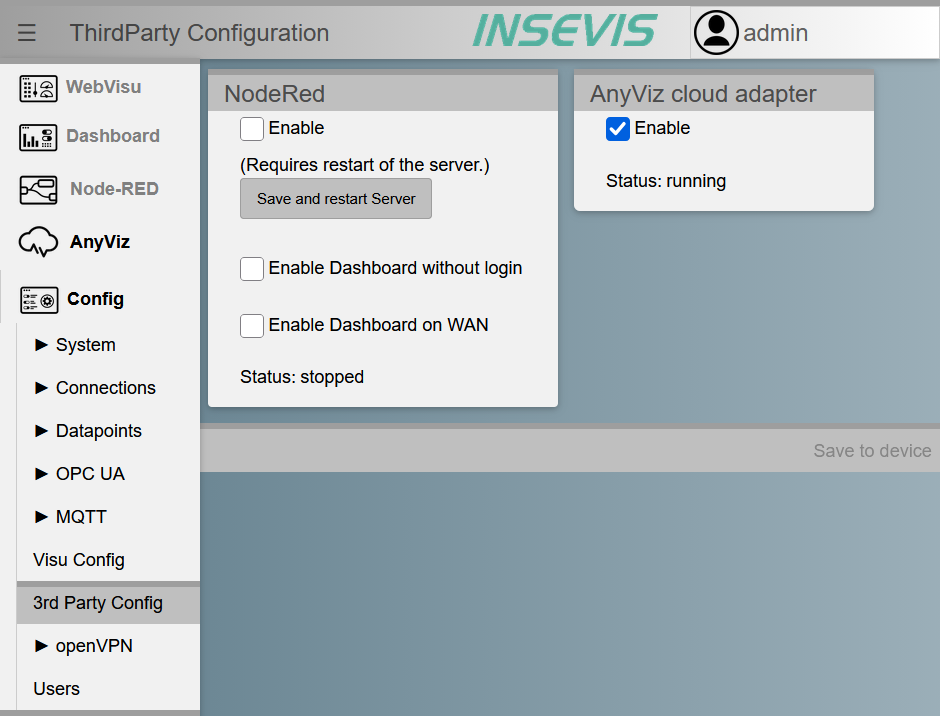
Navigate to Config → 3rd Party Config and select Enable in the AnyViz cloud adapter section. As soon as the Cloud Adapter has started, the status running is displayed.
Setup
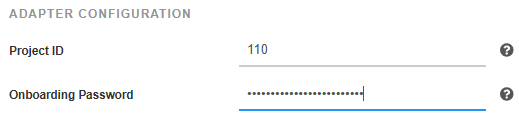
After activation, the menu entry AnyViz appears in the gateway menu. It opens the web interface of the Cloud Adapter. Enter the AnyViz project ID and an onboarding password there.
 Universal Cloud Adapter
Note: For more information about the gateway, refer to the manufacturer's manual.