Wago
The Universal Cloud Adapter is a lightweight application that runs directly on the Linux system of WAGO PFC controllers. It can be installed natively or as a Docker container.
Installation
Connect to the controller via SSH and run the following command:
wget -qO - http://install.anyviz.io | sh
Root privileges are required for the installation. Either log in directly as root or switch to the administrative shell using the su command.
Docker
Alternatively, the Cloud Adapter is available as a Docker container. To persist the configuration outside the container and to enable AnyViz VPN, start the container as follows:
docker run -d -it \
    --net=host \
    --cap-add=NET_ADMIN \
    --device /dev/net/tun:/dev/net/tun \
    --restart=always \
    --name=anyviz \
    -v /etc/anyviz:/etc/anyviz \
    wagoautomation/anyviz
For more information, visit Docker Hub.
Setup
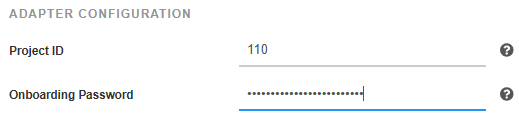
After successful installation, the web interface of the Cloud Adapter is available under port 8888 (e.g. http://[IP address]:8888). Enter the AnyViz project ID and an onboarding password there.
 Universal Cloud Adapter
Configure firewall
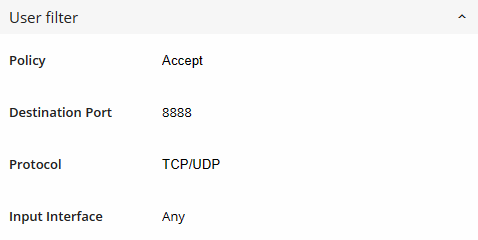
If the web interface is not accessible and the firewall is enabled, an exception must be added. To do this, navigate to Security → Firewall → User filter in the WBM and add the following rule:
| Policy | Accept |
| Destination Port | 8888 |
| Protocol | TCP/UDP |
| Input Interface | Any |
Access PLC Variables
The easiest way to access the variables of the PLC program is an OPC-UA connection.
In the web interface of the Cloud Adapter, navigate to Connections and create a new OPC-UA connection with the server URL opc.tcp://localhost and the credentials of the controller.
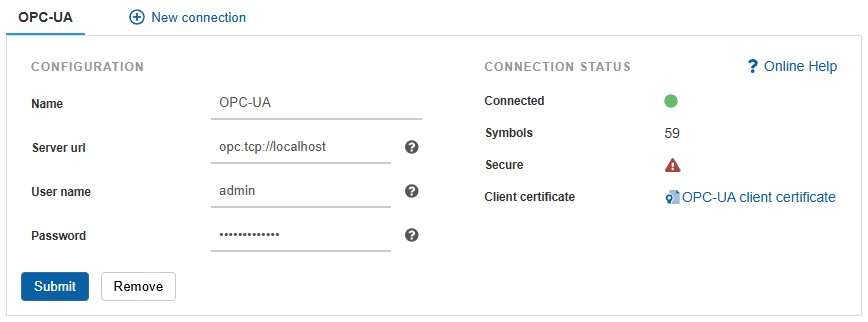
Make sure that the OPC-UA service is enabled in the WBM under Fieldbus → OPC-UA → Configuration and that the PLC program contains a symbol configuration.
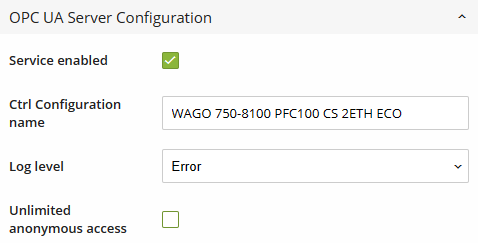 OPC-UA
Note: For CODESYS V3 based controllers, the CODESYS Cloud Adapter can be used as an alternative. It is delivered directly with the PLC program and requires no changes to the Linux system.