
MB connect line
mbNET devices offer a high level of security thanks to their hardened firmware. To run additional applications, some devices support Docker containers. The Universal Cloud Adapter is installed as a Docker container via the integrated Portainer interface.
Enable Docker
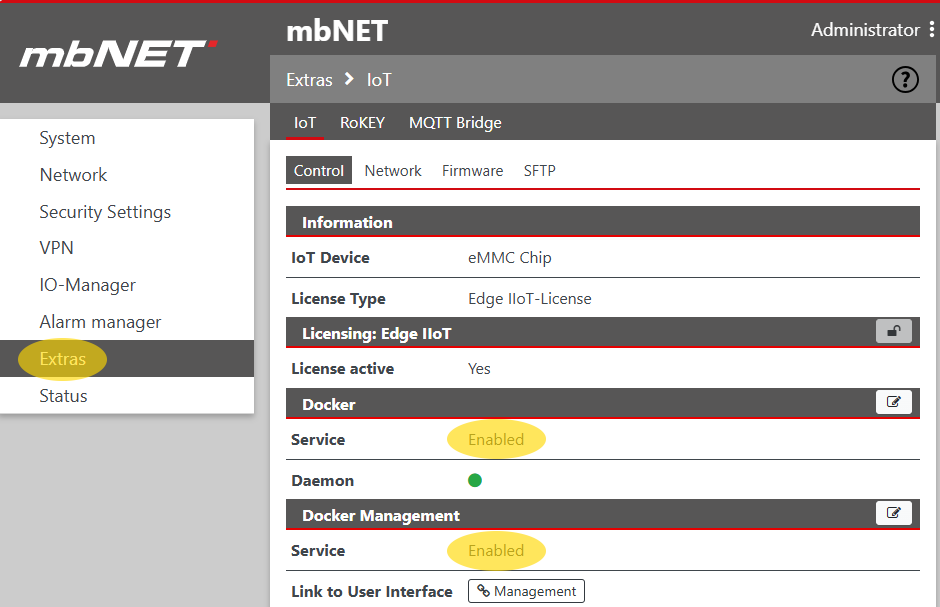
The Docker service must first be activated. To do this, navigate to Extras → IoT → Control and enable the service in the sections Docker and Docker Management. Then click Management to open the Portainer interface.
Configure Docker Stack
- In the Portainer interface, select the environment local
- Navigate to Stacks and click Add stack
- Enter a name (e.g. anyvizcloudadapter)
- Copy the following content into the Web editor:
services:
    cloudadapter:
        image: anyviz/cloudadapter
        restart: always
        container_name: anyviz
        ports:
            - "8888:8888"
            - "9999:9999"
        volumes:
            - anyviz_config:/etc/anyviz
        network_mode: "host"
        cap_add:
            - NET_ADMIN
        devices:
            - /dev/net/tun

volumes:
    anyviz_config:
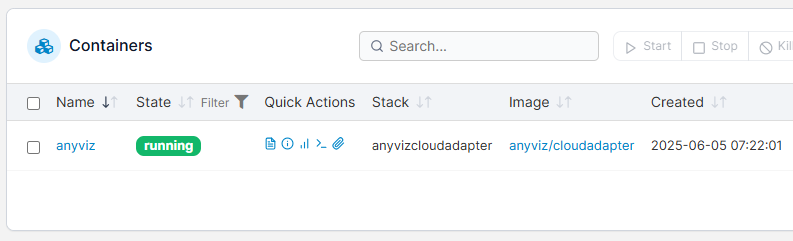
Click Deploy the stack and wait until the container status shows running.
Setup
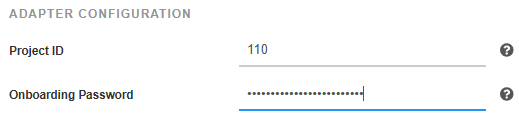
The web interface of the Cloud Adapter is now available under the IP address of the mbNET device and port 8888 (e.g. http://[IP address]:8888). Enter the AnyViz project ID and an onboarding password there.
 Universal Cloud Adapter